Patient FAQ
What’s included with the HeartBeam system?
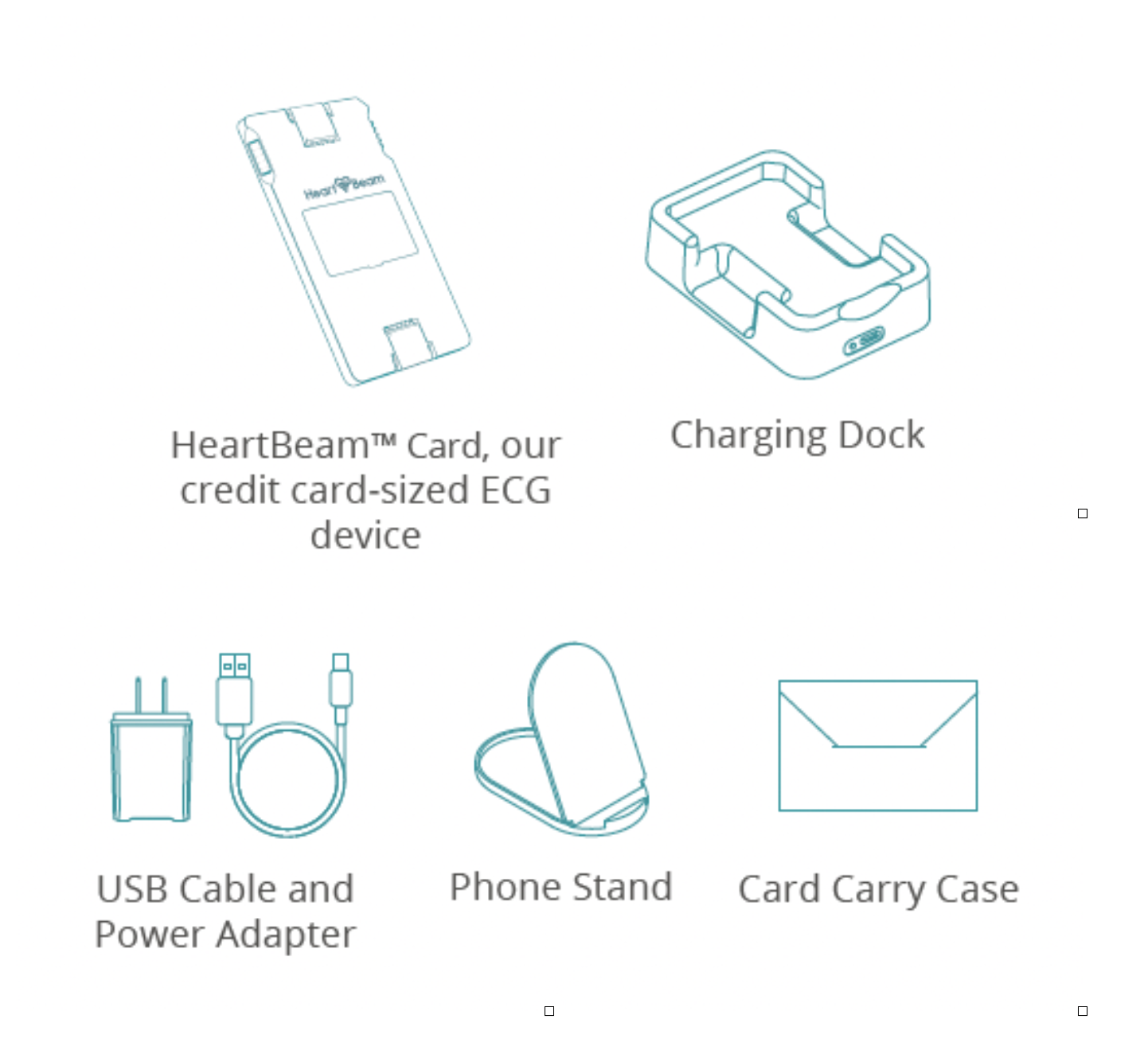

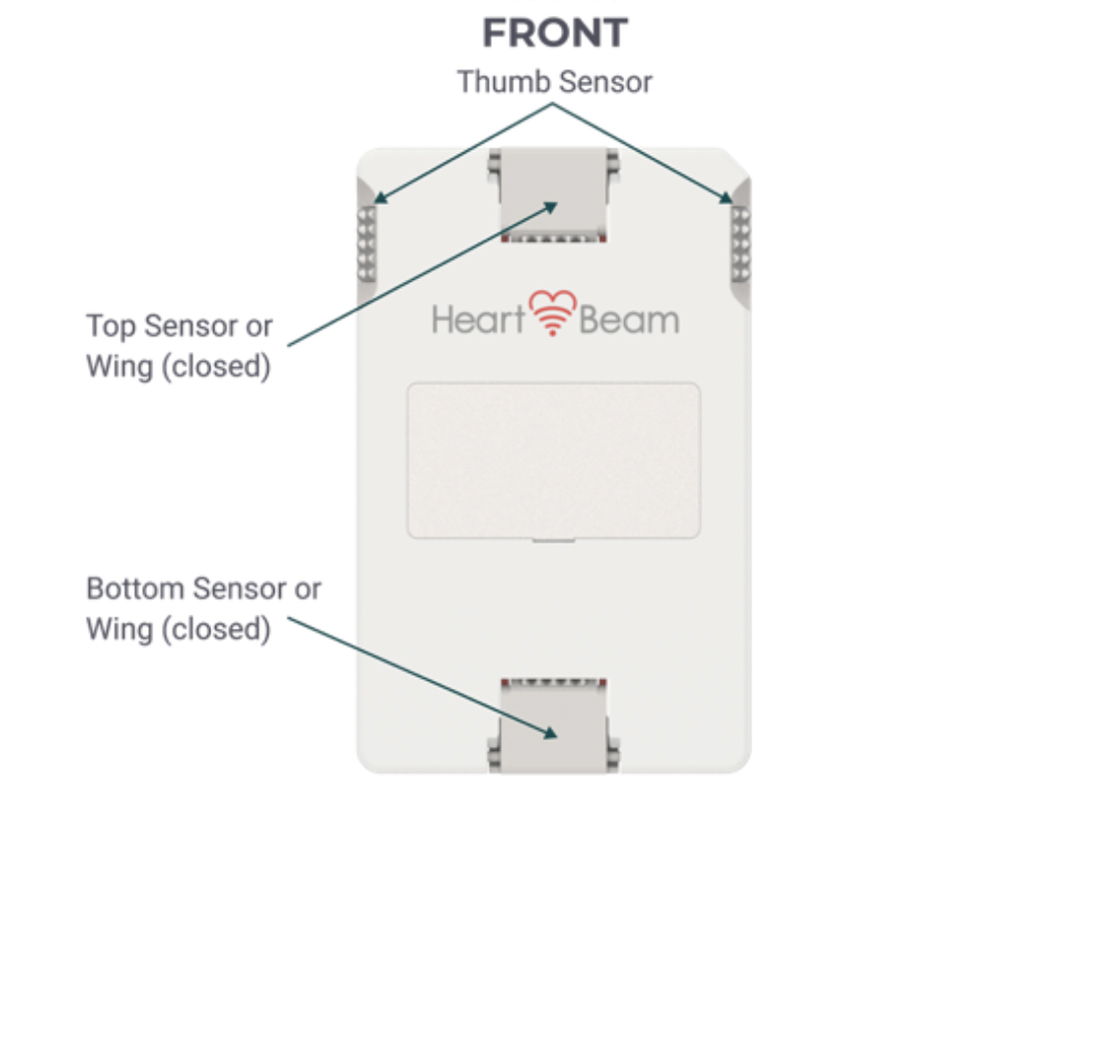
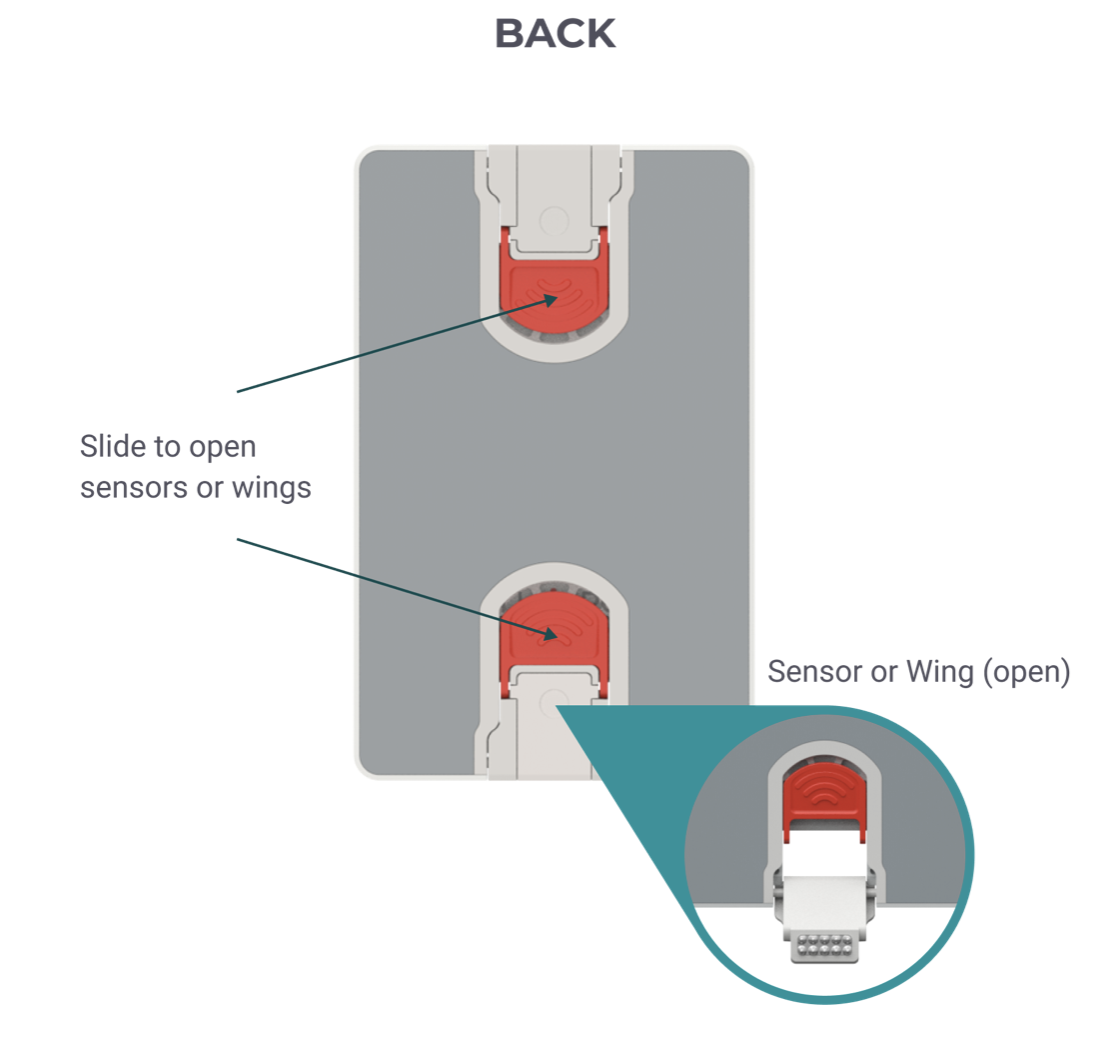
Get to know your HeartBeam Card (Our credit-Card sized ECG device):
General Questions
Below are common patient questions and/or concerns.
How is the HeartBeam ECG system different from the ECG I get at my doctor’s office?
The HeartBeam Card is a small, wireless device that allows you to take ECG recordings from wherever you are. Unlike ECGs in a doctor’s office, no bulky equipment or trained technicians are required. You may use it on your own to capture data and share results with your doctor, helping them monitor your heart between visits.
What is the difference between HeartBeam’s synthesized 12-Lead ECG and a 12-Lead ECG from my doctor’s office?
The synthesized 12-Lead ECG from the HeartBeam System is very similar, but not identical, to the standard diagnostic 12-Lead ECG from your doctor’s office.
The HeartBeam Card is the only device you can use at home to record your heart’s electrical activity in three directions without any cables. The technology captures a 3D signal and turns it into a "12-Lead" heart signal—the kind of visual 12-Lead ECG representation doctors typically get in a clinic.
The HeartBeam System uses personalizeduses personalized signals of your own heart to generate a “synthesized” 12-Lead ECG view. Your doctor can then use this data to check for indicated heart rhythm issues even when you aren't at their office. This synthesized 12-Lead ECG provides additional information for a physician or healthcare professional when a standard 12-lead ECG is not readily available.
Does the HeartBeam ECG System detect heart attacks?
No, the HeartBeam system does NOT detect heart attacks.
WARNING: Call 911 or contact your doctor immediately if your symptoms feel like an emergency.
Does the HeartBeam System provide an official diagnosis?
No, the HeartBeam System does not provide any official diagnosis. The HeartBeam System provides additional cardiac information to your doctor which they may utilize when assessing your heart rhythm diagnostic conditions.
Charging the HeartBeam Card
How long does it take to charge the HeartBeam Card?
The HeartBeam Card takes up to 2 hours to fully charge. You may charge it overnight; the Card will not “overcharge.” Many users charge the Card as they would charge their mobile phone.
When the HeartBeam Card is in the charger, what do the different LED light indicators on the Card mean?
- Brief period of fast blinking blue: Wireless charging is initializing
- Slow blinking blue: Charging is in progress
- Solid Blue: The HeartBeam Card is fully charged
- Off: The HeartBeam Card is not charging
- Note, the charging dock LED will be solid white when powered
How long does a full charge last?
A full charge will last about 30 days with weekly recordings. However, it is recommended to keep the HeartBeam Card in the charger when not in use. Many users charge the Card as they would charge their mobile phone.
Using the HeartBeam Card
Do I need to remove my clothes to record with the HeartBeam Card?
Not necessarily. The HeartBeam Card needs to be placed directly on the skin, so it is recommended to wear clothing that provides easy access to the chest. The top and bottom sensors should be unobstructed by any clothing or jewelry.
Can I use the HeartBeam system if I have chest hair?
Yes, chest hair should not impact the recording. However, you may need to slightly adjust the upper and lower chest sensor placement, or the level of pressure applied on these sensors, to ensure proper skin contact (e.g., under the chest hair).
Can I use the HeartBeam Card if I have lotion on my skin?
For the most accurate recording, it is recommended to use the HeartBeam Card on clean skin. The best practice is to wash your hands with soap and water and ensure your chest is clean. Lotions, creams, and gels may interfere with the Card’s sensor contact. In some situations, during dry-seasonsdry seasons for example, it may be beneficial to slightly dampen the skin by applying a drop of water to the chest where the sensors are placed and/or the thumbs, as needed.
Will the Card shock me if I use it while I am wet?
No, but you should not be dripping wet (as out of a shower or pool)), and the Card should not be used while bathing or swimming. In some situations, excess moisture or sweat for example, it may be helpful to dry your hands and/or chest with a soft cloth before using the Card. This can help ensure good ECG signal quality.
Can I take a HeartBeam recording while laying down?
No, recordings are meant to be taken while sitting and reclined comfortably in a chair or couch with sufficient back support.
Can I take a HeartBeam recording while standing up?
No. It is recommended that you sit down and recline comfortably in a chair or on a couch with sufficient back support. Recordings taken while standing are more likely to encounter signal quality errors, due to excess motion, compared to sitting down relaxed and leaning back.
How long does a HeartBeam ECG recording take?
Each HeartBeam ECG recording takes around 30-seconds, plus an additional 15-seconds to analyze and transmit the recording to your prescribing physician and/or a Cardiologist Reader.
Do I need to hold my HeartBeam Card to my chest while my app says “Analyzing”?
No, after the 30-second recording session has ended you may remove the Card from your chest and relax while the recording is being analyzed.
When will I receive the results of my HeartBeam ECG recording?
For symptomatic recording, you will be able to see the assessment results once the recording is reviewed either by your prescribing provider or a cardiologist reader. This typically takes place within 30 minutes, and you will be informed by notification and text when your results are available in the Reports tab of the App.
For asymptomatic or routine recordings, you may not see the results if no follow up is required. Your prescribing provider may review all recordings made through the HeartBeam system with you at the next appointment.
May I resume normal activities after using the HeartBeam Card?
Yes, there is no downtime or recovery needed after using the HeartBeam Card.
Navigating the MyHeartBeam App
How do I choose whether to perform a Routine or Symptomatic recording?
You should choose the recording type that best fits the situation:
- Routine: Use when you feel fine and are making a recording as part of your scheduled routine determined with your clinician or if you just want to establish a daily habit of taking an ECG and add to your ECG dataset for long-term record and reference.
- Symptomatic: Use if you are feeling symptoms and would like to capture an ECG recording for your clinician.
Can I connect the HeartBeam Card to my phone or the MyHeartBeam App while the Card is in the charging dock?
No. The Card must be out of the charging dock for at least 10-seconds before attempting to connect to your phone or the MyHeartBeam App. If you attempt to connect to the Card while it is charging it will not connect. See Troubleshooting Tips in the Patient User Manual for more information.
Can I connect the HeartBeam Card to my phone if my phone is charging?
Yes, if the HeartBeam Card is out of its charging dock for at least 10-seconds and is near your charging phone, the Card will connect.
My Card has been out of the charging dock for a day or two but was fully charged before. Why won’t its lights blink or connect?
You may need to place the Card in the charging dock for up to 30 seconds to wake it up. Additionally, you may try to close and re-open the MyHeartBeam App on your phone, then re-try the Bluetooth connection.
Why do the sensor indicators show as green during the Hand Placement 10-second countdown, but my recording failed?
- If your recording failed due to “Poor ECG Signal Quality,” you may have moved during the 30 second recordings. Try to remain still and quiet. If this error persists, ensure the youryour skin is clean and free from any excess oils or debris. In some situations, during dry-seasonsdry seasons for example, it may be beneficial to slightly dampen the skin by applying a drop of water to the chest where the sensors are placed and/or the thumbs, as needed.
- If your recording failed due to “Device Position,” the Card’s position on your chest may not be optimal. Ensure you are following the device positioning guidance in the App (and Patient User Manual). Additionally, make sure you are sitting down, leaning back against a supportive chair, and remain quiet and still during the recording. If this error persists, you may try re-recording with the Card 1-2 cm left/right, up/down to optimize the Card’s position.
If I don’t see the green sensor indicators turn green during the Hand Placement 10-second countdown, should I still go through with the 30-second recording or start over?
Red indicators during the Hand Placement 10-second countdown may indicate poor skin contact on one or more sensors. Do your best to ensure the indicators turn green before the 30-second recording begins. However, it is recommended to complete a recording session in full once you’ve begun. If the recording is unsuccessful due to signal quality or positioning error, you may try again.
WARNING: Call 911 or contact your doctor immediately if your symptoms feel like an emergency.
How can I share my HeartBeam ECG recording with my doctor?
In the app, go to Home Screen > Reports and select the report you would like to share. Click “Email” to directly share your report with your doctor via email or “Download” to save a copy to your phone.
Proper Use
Can the HeartBeam Card be shared with someone else?
The HeartBeam Card should not be shared with anyone other than the person it’s prescribed to and would not work properly on other users because at the time of onboarding, the device and your patient profile was personalized to you. Any other individual using the Card may get incorrect results.
Should I use the HeartBeam system if I have a pacemaker or other cardiac implanted device?
No, the HeartBeam system is not intended for users who have implanted devices. This system has not been tested for use with cardiac implanted devices (e.g., pacemakers, defibrillators).
Can I use multiple smartphones to connect to my HeartBeam Card?
While the MyHeartBeam App can be installed on multiple mobile devices it is recommended to use the Card with your personal mobile device. At login, the App will check to ensure that your Card is connected to the mobile device being used. Using the Card across multiple devices may cause Bluetooth pairing issues.
Account & Device Support
What happens after I send a recording for Cardiologist Review?
Each symptomatic recording is automatically sent to the Cardiologist Review team for assessment. If a non-life-threatening arrhythmia is detected, you receive an in-app notification of the ECG assessment and a text that the assessment is available. The full interpretive report (PDF) is also available in the App and simultaneously, delivered to your prescribing provider.
If your clinic is not enrolled in the Cardiologist Review program, your prescribing provider can still view all uploaded recordings and will contact you if anything unusual is noted.
My HeartBeam Card is broken, what should I do now?
Contact HeartBeam Support (support@heartbeam.com or 1 (844) 443-2782). Be ready to provide the serial number (SN) of the damaged or lost Card (if available) and we will determine next steps to provide a new Card if it was broken under normal use. All prior recordings remain in your cloud profile.
Normal Use: operation, charging, maintenance, and storage of the ECG Card Device and accessories in accordance with the Patient User Manual (D-10001) provided by HeartBeam. The warranty covers defects in materials and workmanship that occur during normal use. Damage or malfunction resulting from use outside the conditions described in the IFU — including physical damage, liquid exposure, unauthorized repairs or modifications, or use with non-approved accessories — is not covered under warranty.
I’m not sure the HeartBeam System is helping me, what should I do next?
The HeartBeam System is prescribed by your provider with the intent that it will benefit you. If you have questions or concerns, please reach out to your prescribing provider directly.
My primary care doesn’t work with HeartBeam—what are my options?
Ask your clinician to contact HeartBeam Support (support@heartbeam.com or 1 (844) 443-2782) to learn more and to arrange account setup. Alternatively, your clinician can refer you to a cardiology practice already partnered with HeartBeam
